Skip to content
The CreatePay Logo in Black
  • Card Machines
    • CreatePay One
    • CreatePay One Pro
  • Who We Help
    • Retail
    • Motor
    • Pubs and Restaurants
    • Hotels
    • Hair & Beauty
    • Construction and Trade
  • Growth Products
    • The CreatePay App
    • Create Commerce
    • Create Funding
    • Create Rewards
  • Help
  • Blog
  • Careers
  • Card Machines
    • CreatePay One
    • CreatePay One Pro
  • Who We Help
    • Retail
    • Motor
    • Pubs and Restaurants
    • Hotels
    • Hair & Beauty
    • Construction and Trade
  • Growth Products
    • The CreatePay App
    • Create Commerce
    • Create Funding
    • Create Rewards
  • Help
  • Blog
  • Careers
Free Quote
Contact Us
The CreatePay Logo in Black
  • Card Machines
    • CreatePay One
    • CreatePay One Pro
  • Who We Help
    • Retail
    • Motor
    • Pubs and Restaurants
    • Hotels
    • Hair & Beauty
    • Construction and Trade
  • Growth Products
    • The CreatePay App
    • Create Commerce
    • Create Funding
    • Create Rewards
  • Help
  • Blog
  • Careers
  • Card Machines
    • CreatePay One
    • CreatePay One Pro
  • Who We Help
    • Retail
    • Motor
    • Pubs and Restaurants
    • Hotels
    • Hair & Beauty
    • Construction and Trade
  • Growth Products
    • The CreatePay App
    • Create Commerce
    • Create Funding
    • Create Rewards
  • Help
  • Blog
  • Careers

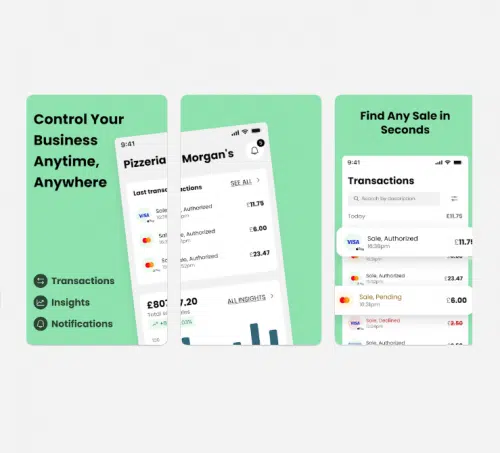
The CreatePay App

The CreatePay App
How To Access The CreatePay App

Click here for guide. The CreatePay App is only available to customers who have a CreatePay Device.

How To View Your Live Transactions

Click here for guide.

Cant find what you need?

  • 03337 720 090
  • hello@createpay.com
The CreatePay Logo in Black

Card Machine

Create Commerce

Create Rewards

Create Funding

CreatePay App

Contact Us

Privacy Policy

About Us


  • Facebook
  • LinkedIn
  • Instagram

CreatePay

  • Home
  • CreatePay One
  • CreatePay One Pro
  • CreatePay App
  • Create Rewards
  • Create Commerce
  • Create Funding
  • Careers
  • Help
  • Contact